
Google Analytics iPhone widget to track traffic and active users on your home screen
Your GA4 numbers stay in reach without opening a browser. Connect the property once and glance any time.
On your Home Screen
Google Analytics iPhone widgets
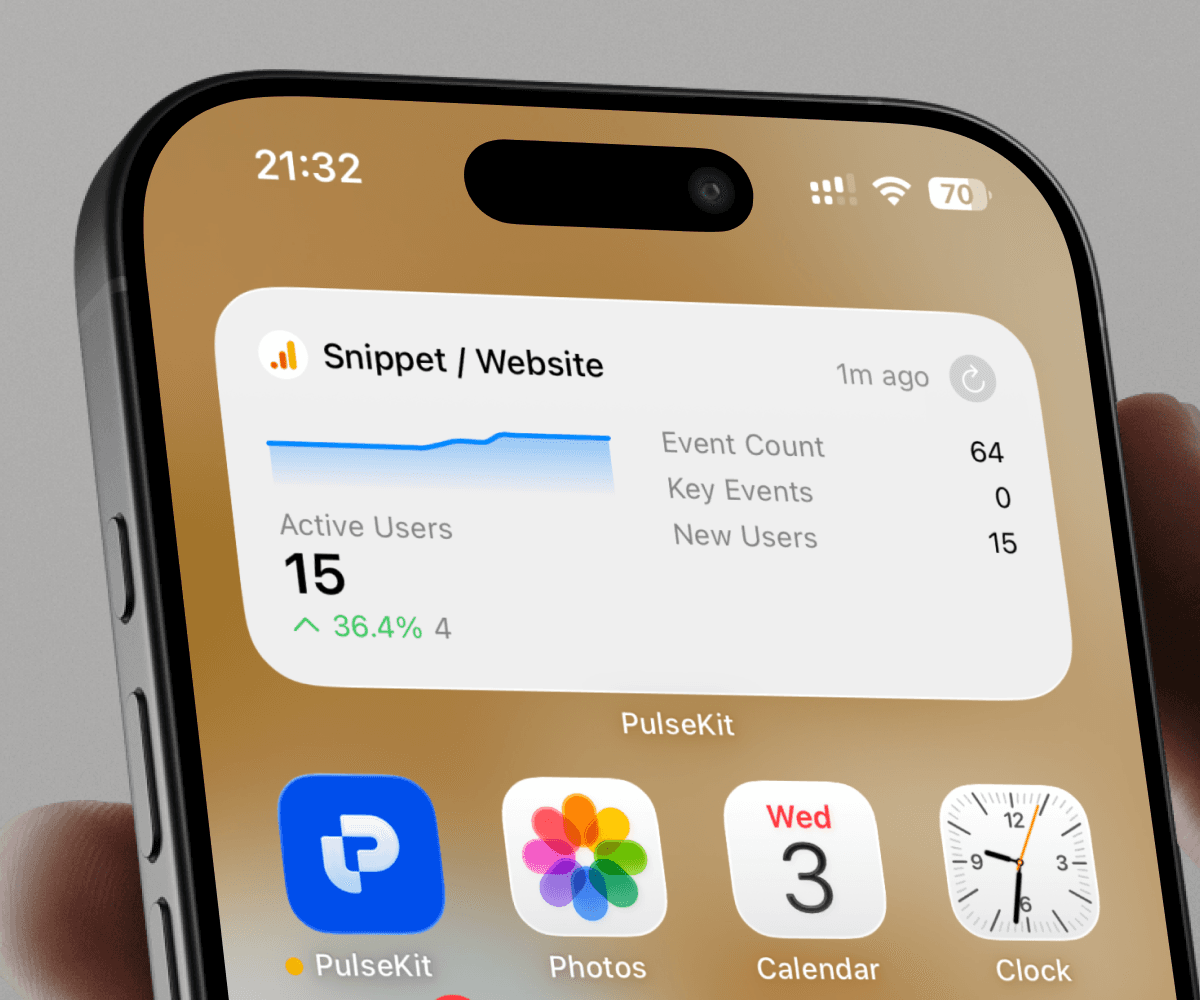
Your GA4 numbers, always in reach
PulseKit pulls four core metrics from your GA4 property and surfaces them directly on your iPhone home screen or lock screen widget: active users for the current month, total event count, key events (conversions), and new users. There is no browser tab to open and no login screen to navigate. The numbers update on demand, so they reflect your current month's data every time you glance at your phone. You can see at a moment's notice whether your site is getting traffic and whether visitors are converting.
One property, zero friction
Connecting takes a single OAuth step with your existing Google account. After that, you pick which GA4 property to monitor from a list tied to your account and the widget is live. If you manage more than one site, you can add additional modules, each pointed at a different GA4 property, and arrange them across multiple home screen widgets. Tapping any widget fetches fresh data for that property on the spot.
A better daily check-in
Most analytics tools are built for deep-dive sessions. Pulling up a dashboard to answer a simple question, such as whether today's launch drove new users or whether a campaign generated key events, costs time and attention. PulseKit is built for the opposite case: a five-second check that tells you whether the number you care about moved. Active user counts tell you if people showed up. New user counts tell you if they are first-timers. Key event counts tell you if they did what you wanted. Event count gives you a broad signal of how much activity happened in total.
How to connect Google Analytics to PulseKit
Connect your Google Analytics account to PulseKit
Security
How we protect your credentials
PulseKit connects to Google Analytics using OAuth. You authenticate on Google Analytics's own login page, Google Analytics returns a short-lived access token to our TLS callback, and you never type a password into PulseKit. Tokens are stored server-side scoped to this device. We ask for the minimum scopes needed and never share them with another device or another app. Refreshes happen automatically without you re-entering credentials, and tapping disconnect inside PulseKit deletes the token immediately so this device can no longer reach Google Analytics.
What you can track
Pick the metrics you care about and pin them as widgets. Numbers below are illustrative — your widgets show your live data.
Website Traffic
Track key metrics for your website this month
- 72Active Users
- 65Event count
- 40Key events
- 12New users
Who uses this
- Indie founders
When you launch a new feature or announce something publicly, you want to know immediately if anyone showed up. PulseKit puts your active user count and new user count on your home screen so you can see the impact of a launch without opening a browser, logging into Google, and navigating to the right property.
- Content creators
Publishing a new article and waiting to see if it drove traffic usually means repeatedly opening Google Analytics throughout the day. With PulseKit, new user counts and event counts update on your iPhone widget, so you know whether a piece of content moved the needle without interrupting your workflow.
- Marketing managers
Running a campaign means tracking whether it is generating conversions, which GA4 calls key events. PulseKit surfaces your key event count and active user count for the month directly on your home screen, giving you a quick read on campaign performance during standups or client calls without pulling up a full dashboard.
- Freelance developers
After shipping a site for a client, you often need a quick answer to whether traffic is growing. PulseKit lets you point a widget at the client's GA4 property and check active users and new users at a glance, without granting the client direct Analytics access or logging into multiple accounts yourself.
FAQs
What metrics does the Google Analytics widget in PulseKit show?
The Google Analytics integration shows four metrics from your selected GA4 property for the current month: Active Users, Event count, Key events, and New users. Active Users counts people who engaged with your site, New users counts first-time visitors, Event count totals all tracked interactions, and Key events counts your defined conversion actions.
Does PulseKit work with GA4 properties?
Yes, PulseKit connects to GA4 (Google Analytics 4) properties. When you set up the Website Traffic module, you choose which GA4 property to track from the list linked to your Google account. Universal Analytics properties are not supported, as Google retired that platform in 2023.
How do I connect Google Analytics to PulseKit?
Open PulseKit, add the Google Analytics integration, and tap Connect. You are sent to Google's own login page to authenticate, so you never enter your Google password inside PulseKit. After granting access, select the GA4 property you want to monitor and the widget is ready to add to your home screen.
Can I track multiple websites with PulseKit?
You can add multiple Website Traffic modules in PulseKit, each pointed at a different GA4 property. Each module appears as a separate widget tile showing that property's Active Users, Event count, Key events, and New users. This is useful if you manage several sites under one Google account.
How often does PulseKit update Google Analytics data?
PulseKit fetches Google Analytics data on demand, meaning it requests fresh data when you open the app or interact with a widget, rather than on a fixed background schedule. Data is retained for up to 30 days. Because GA4 itself processes data with some delay, very recent activity may not appear immediately.
What counts as a key event in Google Analytics?
A key event in GA4 is an event you have marked as a conversion inside Google Analytics, such as a purchase, a form submission, or a sign-up. The Key events metric in PulseKit reflects exactly what you have configured in your GA4 property settings, so the definition is controlled entirely within Google Analytics.
What time period do the Google Analytics metrics in PulseKit cover?
All four metrics, Active Users, Event count, Key events, and New users, reflect data for the current calendar month. The count resets at the start of each month in line with how GA4 reports monthly aggregates. This makes it straightforward to track month-to-date growth without any custom date configuration.
Add Google Analytics widgets to your iPhone
Install PulseKit, paste your credentials, pick a widget.